Gorilla Version Pin
Gorilla Version Pin holds a plugin, or WordPress itself, at a version you choose, with a note saying why. A patch-only pin still lets the small fixes in the same series through, so holding a plugin back does not have to mean going without its security fixes.
You set it up under Tools → Version Pin.
What it does
- Holds a plugin at a version. Nothing past the pin is offered or installed, however the update is started.
- Still lets fixes in. With a patch-only pin at 5.3.7, the fixes 5.3.8 and 5.3.9 still install, and 5.4 waits until you have tested it.
- Says why. The note you write on a pin, such as "5.4 changes the comment form. Testing on staging first.", appears on the Plugins screen and in the message anyone sees when an update is refused.
- Covers every way of updating: the update offer, automatic updates, the update link, a zip upload, a reinstall and WP-CLI. See What a pin blocks.
- Pins WordPress too, with patch-only mode for its maintenance and security releases.
- Shows when a site has moved past a pin, for example after files were copied over FTP, and when a pinned plugin has been deleted.
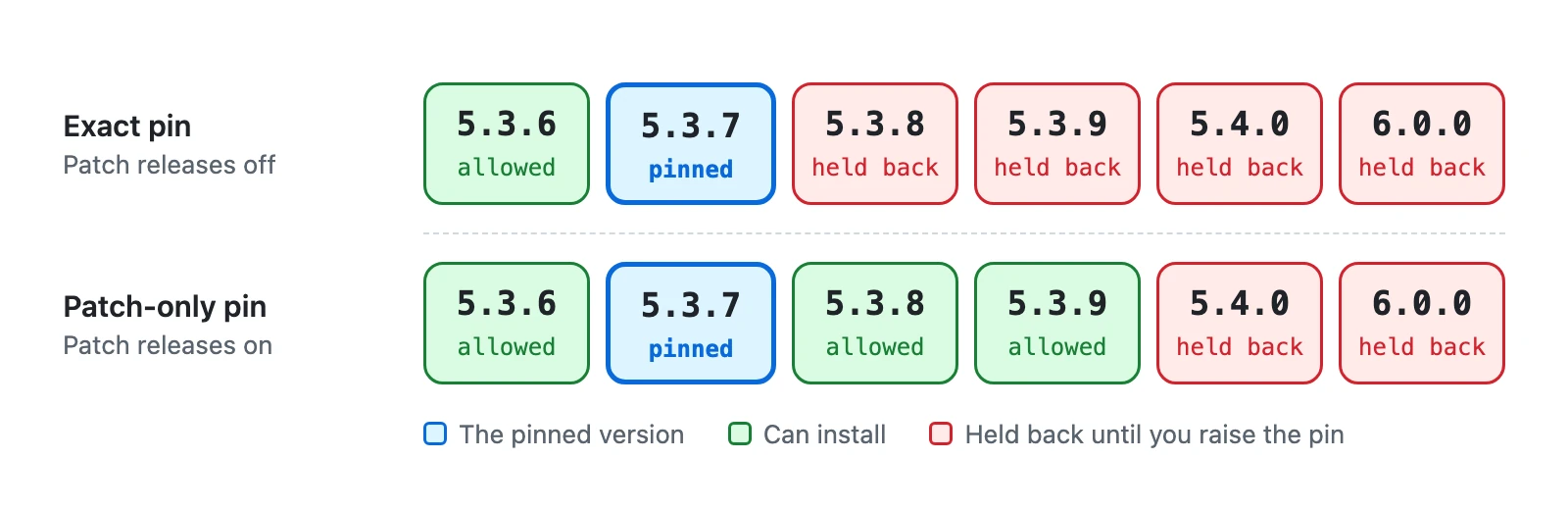
An exact pin also stops security fixes
An exact pin holds a plugin at exactly one version, so a security fix for it is held back too. Use patch-only pins where you can, write a note on every pin, and look at your pins regularly.
What it leaves alone
- It never downgrades anything. A pin below the installed version holds the plugin where it is and tells you so.
- It never deactivates or changes another plugin, including other update managers.
- It does not pin themes or translations. They update as usual.
- It cannot stop files copied onto the server over FTP, with git or by a deploy tool, because WordPress is not asked. The pin then shows Drift, so you can see it.
Free, with no account
Gorilla Version Pin is free on WordPress.org. There is no sign-up, no paid version and no outside service.
Privacy
Your pins are stored in one row of your site's database, and removed when you delete the plugin. The plugin stores nothing about people.
It sends nothing anywhere unless you switch on Find older-series fixes. That asks WordPress.org for the release lists of your patch-pinned plugins, and like every WordPress update check the request carries your WordPress version and your site's address. See What is sent, and when.
Requirements
- WordPress 6.4 or later
- PHP 7.4 or later
- Single sites. On a multisite network it enforces nothing and says so: see Multisite.
Next step
Getting started: install it, pin your first plugin and see the pin at work.