The Status tab
Tools → Staging Guard → Status says whether this site is a staging site or the live site, why, and whether each protection works here.
The verdict
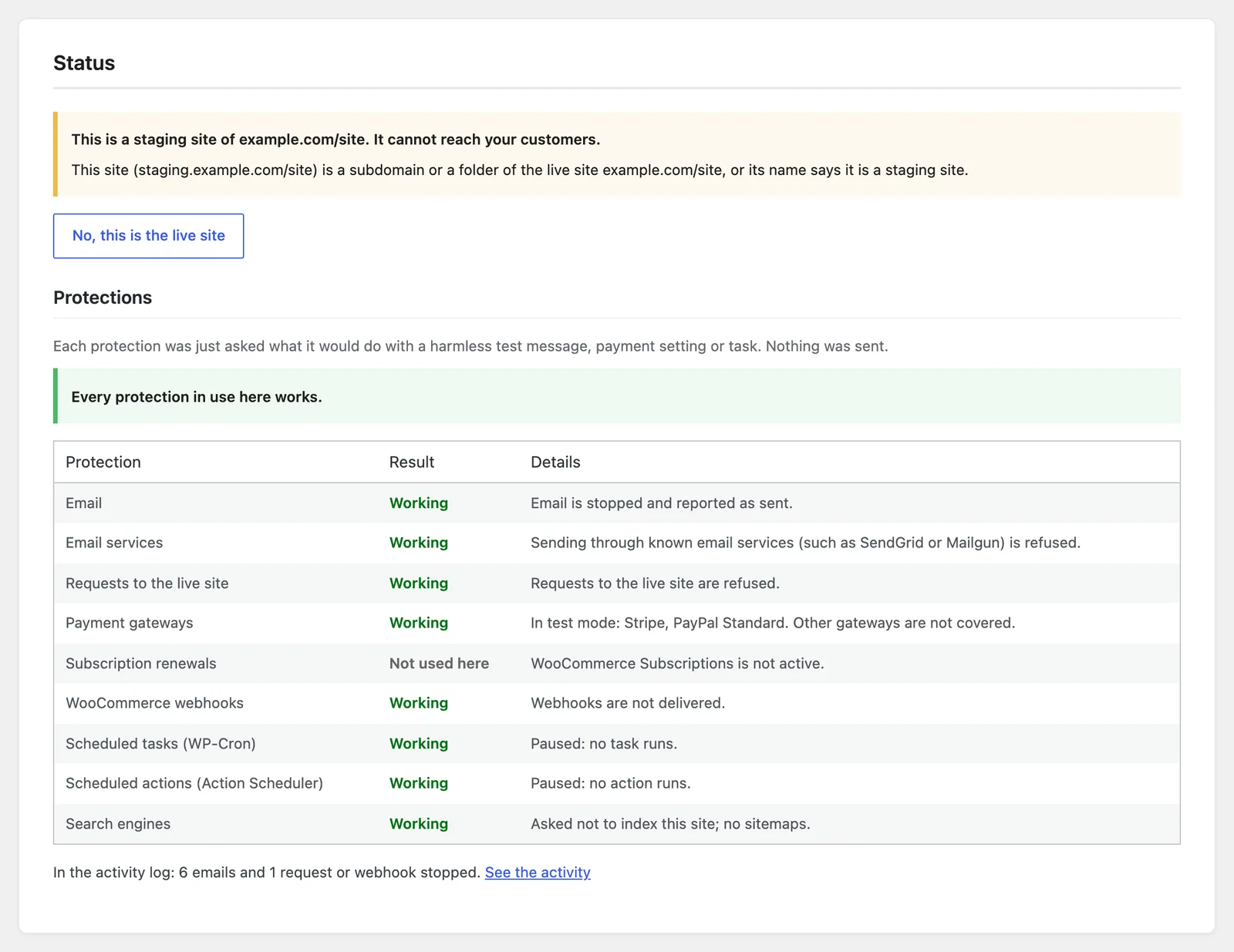
The box at the top says what the plugin decided:
- "This is a staging site of example.com. It cannot reach your customers." Every protection is on.
- "This is a staging site of example.com. Email is switched on here …" Someone switched on Let this staging site send email on this staging site.
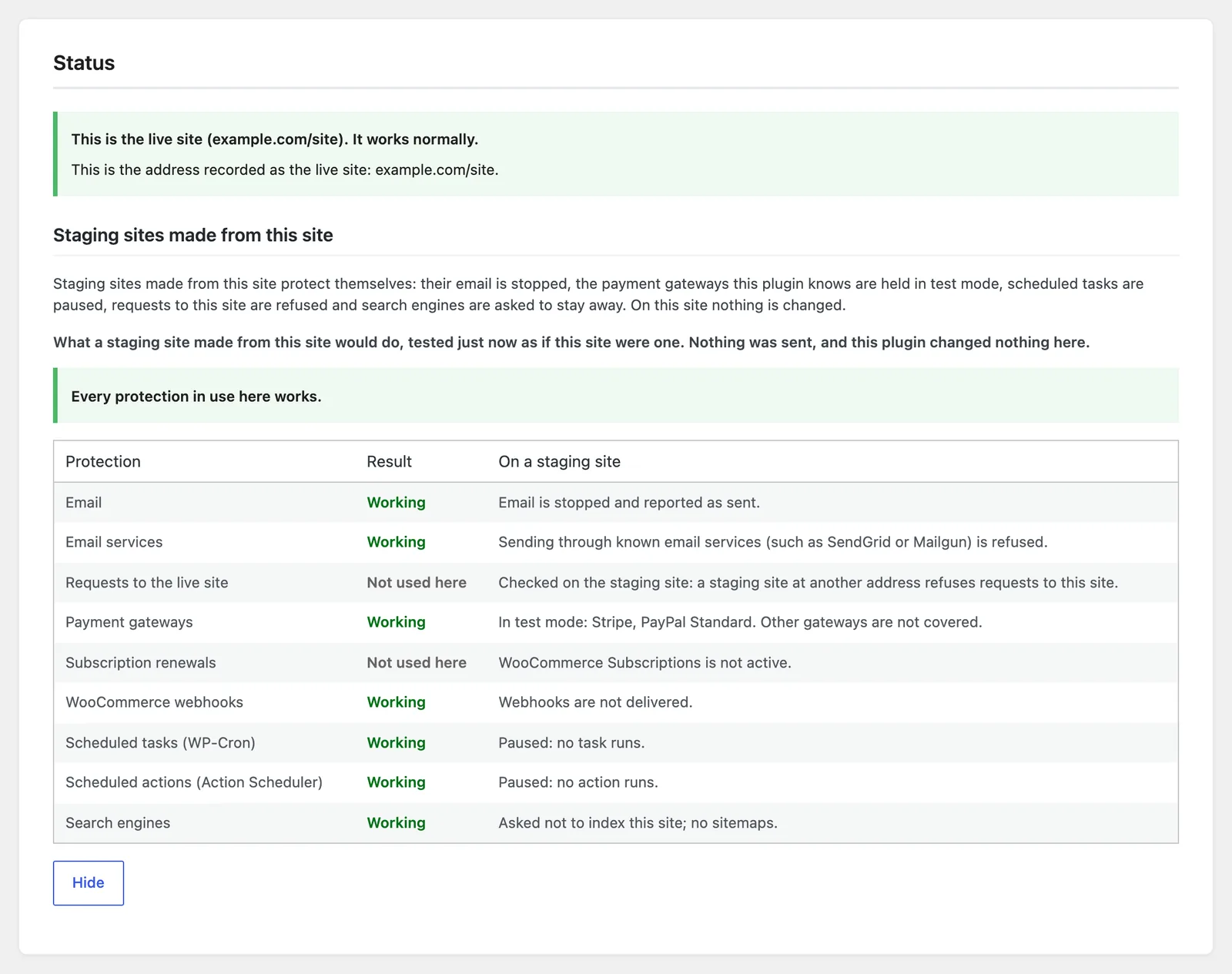
- "This is the live site (example.com). It works normally." Nothing is stopped.
- A question, when the plugin cannot tell: answer it with This is the live site or This is a staging site. Until you answer, the site sends email and takes payments as usual.
- "Gorilla Staging Guard is switched off in wp-config.php." See Switch off every protection.
Below it, one line gives the reason, such as "wp-config.php or the hosting says this is a staging, development or local site." Each reason is explained in How it knows.
When the decision comes from wp-config.php or your hosting, the Status tab says "Set in wp-config.php or by your hosting. Change it there." When it comes from the recorded address, a staging site offers No, this is the live site, for a site that really is live at a new address.
The self-test
On a staging site, the self-test asks each protection what it would do with a harmless test message, payment setting or task, and shows the answer. Nothing is sent. It runs each time you open the tab.
A line above the table sums it up: every protection in use works, or some are partial, or one is not working.
What the results mean
| Result | Meaning |
|---|---|
| Working | The protection answered as it should. |
| Partial | It works, with an exception the row names: a choice you made under Settings, or a plugin it cannot stop. |
| Not working | Something on this site would get through. The row says what; the sections below say what to do. |
| Not used here | Nothing on this site needs it, for example no WooCommerce. |
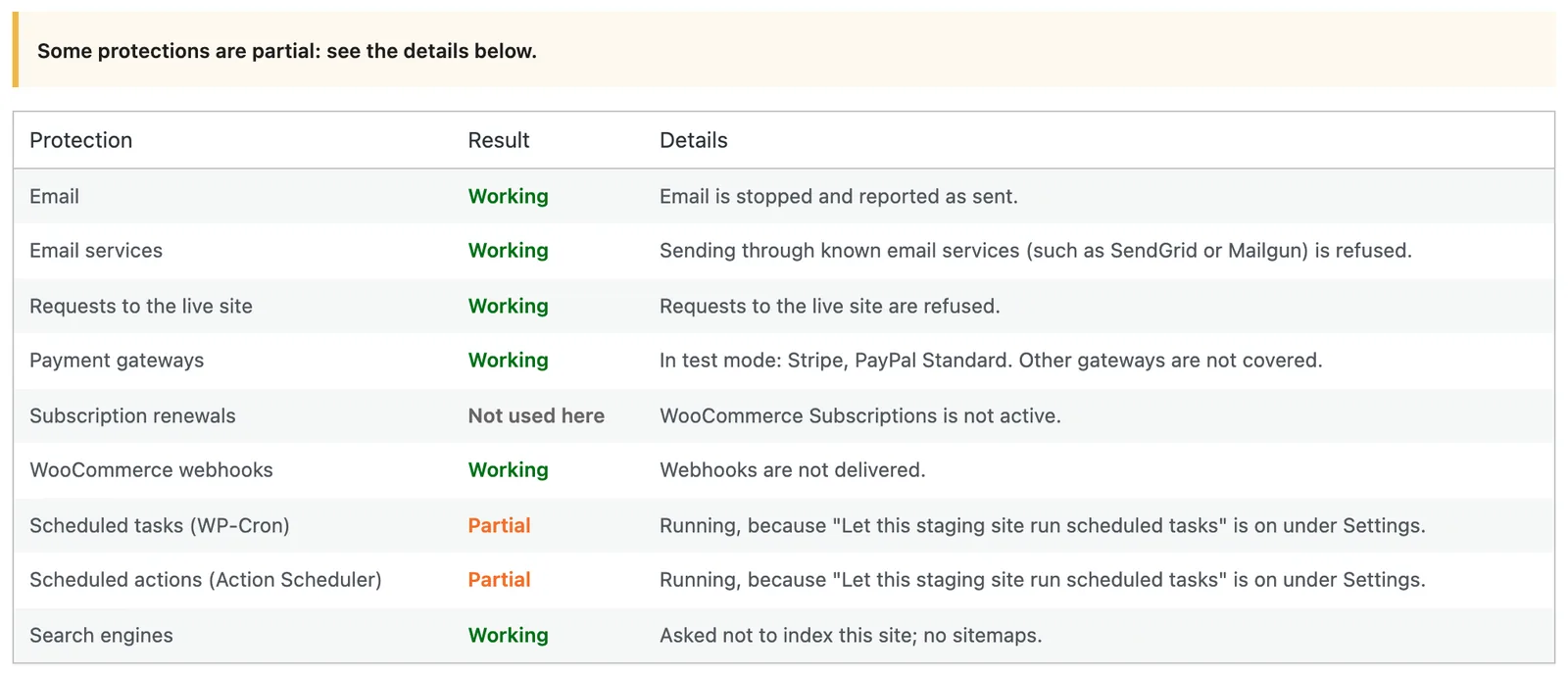
Email
- Working: "Email is stopped and reported as sent."
- Partial: "Email goes out, because 'Let this staging site send email' is on under Settings." Switch it off under Settings when you have finished testing.
- Partial: "Stopped, but these can still send on their own: …" The named plugins send on their own connection, or replace WordPress's email and may never hand a message to it. Deactivate them on the staging site, or switch off their sending in their own settings. See What no plugin can stop.
- Not working: "An email would be sent: another plugin let it through after this one stopped it." Another email plugin overrides the stop. Deactivate other email plugins one at a time and open the Status tab again to find it.
Email services
- Working: sending through known email services (such as SendGrid or Mailgun) is refused.
- Partial: allowed, because "Let this staging site send email" is on.
- Not working: "another plugin answers first." A plugin answers WordPress's outgoing requests before this one can refuse them. Deactivate plugins that change outgoing requests (proxies, request loggers, caching of remote calls) one at a time to find it.
Requests to the live site
- Working: requests to the live site are refused.
- Not used here: "No live address is known yet." The live site has not recorded its address. Open the dashboard on the live site once, or set the live site address in wp-config.php.
- Not used here: "Checked on the staging site …" Shown on the live site: a staging site at another address refuses requests to this one.
- Not working: another plugin answers WordPress's outgoing requests first, as for email services above.
Payment gateways
- Working: "In test mode: …" Lists the gateways held in test mode. Other gateways are not covered.
- Not used here: none of the gateways it knows is set up.
- Not working: "Not held in test mode: …" The named gateway still reads its live mode, usually because another plugin or the gateway's own code decides it. Do not switch the gateway to test mode in its settings on the staging site: that setting would travel back to the live site with a push. Ask the gateway's support which setting holds its mode.
Subscription renewals
- Working: WooCommerce Subscriptions treats the site as a staging site, so renewals are not charged automatically.
- Not working: WooCommerce Subscriptions would charge renewals here. Check that no other code tells it the site is the live one, and contact support.
- Not used here: WooCommerce Subscriptions is not active.
WooCommerce webhooks
- Working: webhooks are not delivered.
- Not working: webhooks would be delivered. Pause them under WooCommerce → Settings → Advanced → Webhooks on the staging site, and contact support.
- Not used here: WooCommerce is not active.
Scheduled tasks (WP-Cron)
- Working: paused; no task runs.
- Partial: running, because Let this staging site run scheduled tasks is on.
- Not working: scheduled tasks would run. Another plugin starts them; deactivate plugins that run tasks themselves to find it.
Scheduled actions (Action Scheduler)
- Working: paused; no action runs.
- Partial: running, because "Let this staging site run scheduled tasks" is on.
- Not working: scheduled actions would run, as for WP-Cron above.
- Not used here: Action Scheduler is not active.
Search engines
- Working: asked not to index this site; no sitemaps.
- Not working: search engines may index this site. An SEO plugin may override the robots setting; check its settings on the staging site, or put the staging site behind a password at your host.
On the live site: What would a staging site do?
On the live site, the Status tab offers What would a staging site do?. It runs the same self-test as if this site were a staging site, only while the test runs: nothing is sent and nothing is changed. Use it before you make a staging site, and after you add a plugin that sends email or takes payments. Hide closes the results.
Other messages on the Status tab
- "Also active here: …" Other staging or email-blocking plugins are active. They can run alongside it; see Compatibility.
- "This staging site's own settings say 'Discourage search engines'." Hosting staging tools often tick that box. Pushed over the live site, it would hide the live site from search engines too. Untick it under Settings → Reading on the staging site and save. It still looks ticked afterwards, because the plugin reads it as on, but the stored setting is now off and the warning goes away.
- "In the activity log: …" A count of what was stopped recently, with a link to the Activity tab.
Related
- How it knows: every reason the Status tab can give.
- The Activity tab: what was stopped, and when.
- Settings: what a staging site may still do.