Settings
Tools → Staging Guard → Settings shows different choices on a staging site and on the live site.
- On a staging site: what this staging site may still do, such as send you email or run its scheduled tasks.
- On the live site: how long activity is kept, the "Env: Production" label and what happens when the plugin is deleted.
- On every site: the settings you can put in wp-config.php, with what each one is set to on this site.
Why a staging site's choices stay on that staging site
A staging site's choices are tied to the address where they were made. That keeps them from going anywhere else:
- A staging site freshly copied from the live site starts with all of them off again, because the live site's database never had them.
- Pushed over the live site, they do nothing there, because the live site has another address.
- Payments stay in test mode whatever you choose. No setting lets a staging site take real payments.
The choices for one person (Send to me and Send critical-error emails to me) apply to whoever switched them on, at this address.
On a staging site: what it may still do
Email is stopped for everyone until you allow it. A message goes out only when every recipient is allowed, so a customer copied on a message is never reached by accident.
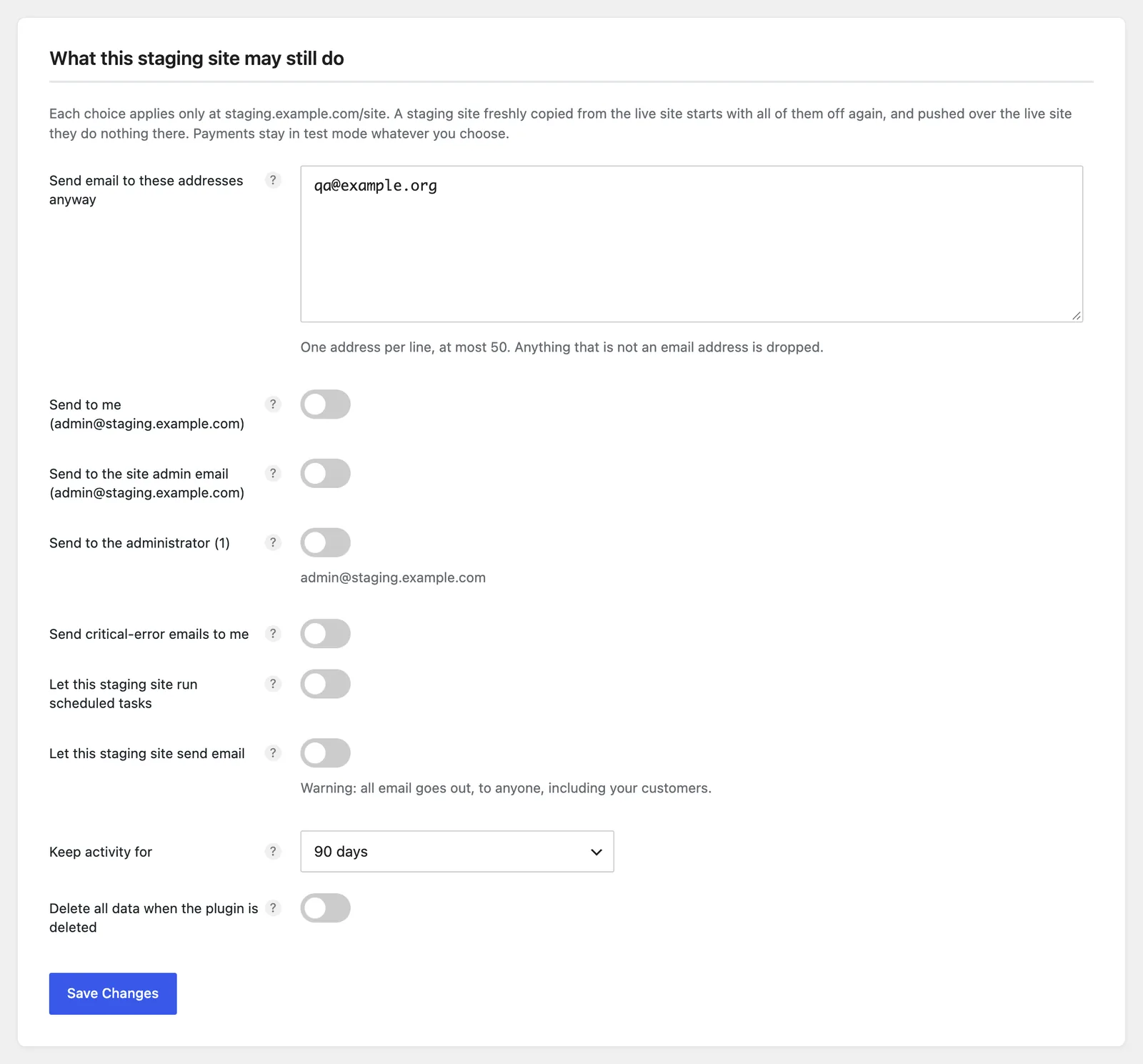
Send email to these addresses anyway
Mail to these addresses still goes out from the staging site, so you can test forms and orders. One address per line, at most 50; anything that is not an email address is dropped. Every recipient of a message must be on the list (or allowed by a switch below).
Send to me
Mail addressed only to you, or to you and other allowed addresses, goes out from the staging site. Off by default. It applies to you only: each person switches it on for themselves.
Send to the site admin email
Mail to the address under Settings → General → Administration Email Address goes out. Off by default. On a staging site that is usually the live site's owner, often your client: they will receive mail from the staging site.
Send to all administrators
Mail to every administrator of the site goes out. Off by default. On a staging site these are the live site's people.
Send critical-error emails to me
When the staging site hits a fatal error, WordPress's recovery link comes to you instead of the live site's admin. Off by default. It applies to you only.
Let this staging site run scheduled tasks
WP-Cron and Action Scheduler run on the staging site, so you can test a scheduled job. Off by default. Payments stay in test mode whatever you choose; WooCommerce Subscriptions still does not charge renewals.
Let this staging site send email
Real emails
Every email the staging site sends goes to its real recipient, customers included.
Off by default. Use it only on a staging site with test data, and switch it off when you have finished. While it is on, the Status tab says "Email is switched on here".
On every site
Keep activity for
How long entries stay on the Activity tab: 30, 60, 90, 180 or 365 days. 90 by default. Older entries are removed once a day, and at most 10,000 are kept.
Show the environment in the admin bar
On the live site, shows "Env: Production" in the admin bar. On by default. Staging sites always show their own label (such as "Env: Staging"), whatever is chosen here: see The label in the admin bar.
Delete all data when the plugin is deleted
When on, deleting the plugin from the Plugins screen removes its settings, the live site's recorded address, the activity table and each person's answers. When off, they are kept, so the plugin picks up where it left off if you install it again. Off by default.
Like a staging site's choices, it applies only at the address where it was switched on. On a network each site decides for itself.
Settings in wp-config.php
For hosts and agencies who set up sites in code. Add a line to wp-config.php above
/* That's all, stop editing! */. The Settings tab shows what each one is set to on this site.
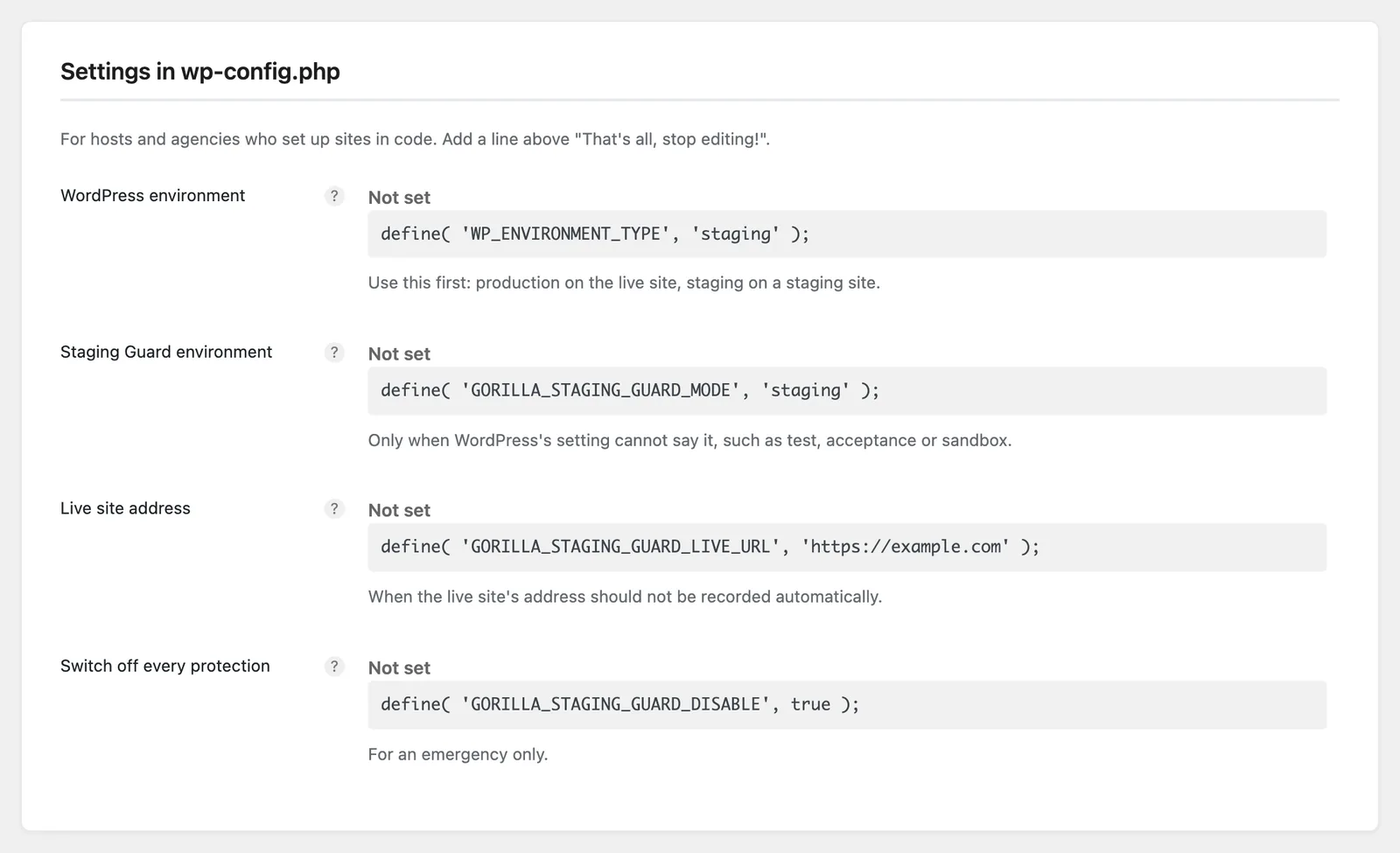
WordPress environment (WP_ENVIRONMENT_TYPE)
define( 'WP_ENVIRONMENT_TYPE', 'staging' );
Use this first: production on the live site, staging on a staging site. It is WordPress's own setting, read
by other plugins too, and a server can set it instead of wp-config.php. It takes production, staging,
development or local. development also turns on WordPress's debug mode unless WP_DEBUG is set, and local
lets application passwords work without HTTPS, so staging is the safe choice for a staging site.
Staging Guard environment (GORILLA_STAGING_GUARD_MODE)
define( 'GORILLA_STAGING_GUARD_MODE', 'staging' );
Only when WordPress's setting cannot say it, such as test, acceptance or sandbox. It takes production,
staging, development, test, local, acceptance or sandbox; copy and clone mean staging. It applies to
this plugin only, without WordPress's side effects, and takes precedence over WP_ENVIRONMENT_TYPE. The admin bar
shows the environment it names.
Live site address (GORILLA_STAGING_GUARD_LIVE_URL)
define( 'GORILLA_STAGING_GUARD_LIVE_URL', 'https://example.com' );
When the live site's address should not be recorded automatically. Every other address is then treated as a staging site. On a network it applies to every site.
Switch off every protection (GORILLA_STAGING_GUARD_DISABLE)
define( 'GORILLA_STAGING_GUARD_DISABLE', true );
For an emergency only
Email, payments, scheduled tasks and search engines are no longer held back on any site where this is set.
The Status tab then says the plugin is switched off. Remove the line to protect the site again.
Related
- Privacy: what the plugin stores, and what deleting it removes.
- For developers: filters for hosts, agencies and plugin authors.